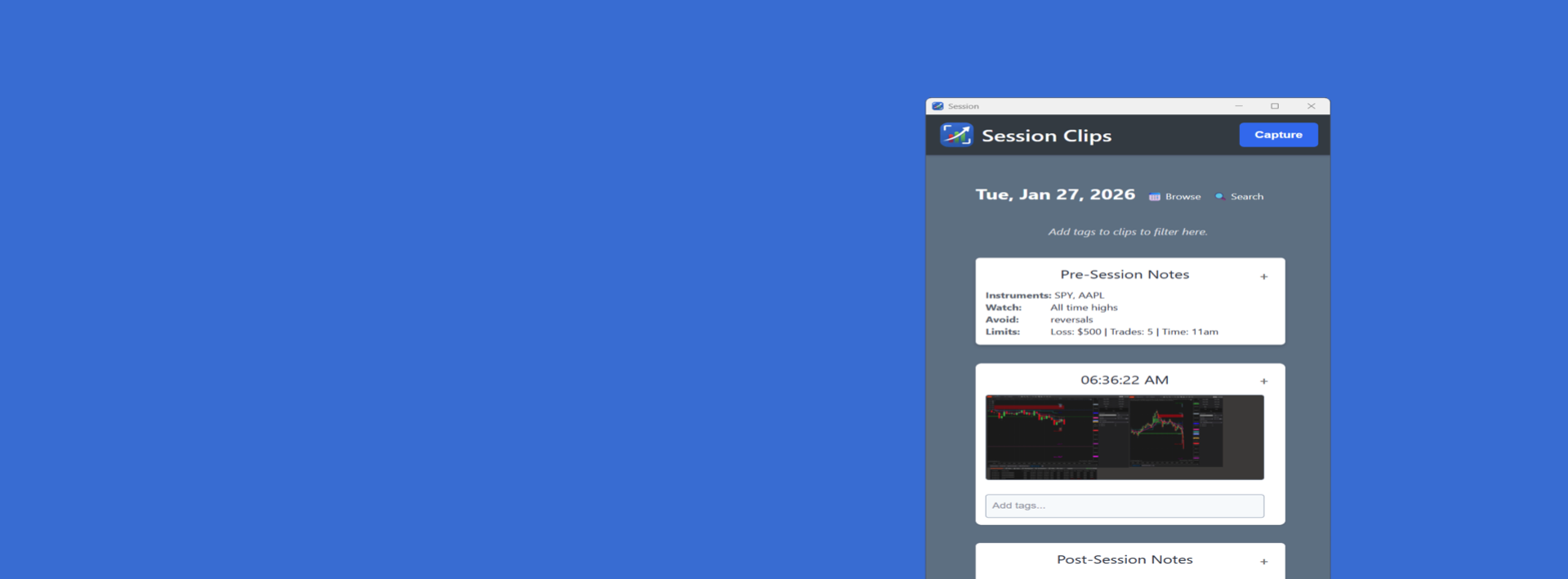
Plan → Execute → Improve

Plan your trading session. Capture and review execution trade-by-trade with screenshots and notes. Reinforce what works—and drive better results.
Document your trading plan

Write your pre-session trading plan, what you're watching, and your risk rules.

Review execution & process

Review your decisions in sequence to see what helped—and what hurt—your process.
Analyze with AI

Use your own AI (BYOK) to analyze screenshots, tags, and notes. Get AI insights in one click.

Capture trade-by-trade context

Take screenshots when decisions matter, add notes and markup to record the "why".

Reinforce what works

Identify setups and behaviors that produce your best results and repeat those.
Stay accountable

Use a clean session record to stay honest with your plan—or share exports with a mentor or accountability partner.

Launching March 1, 2026
Sign up for early access and get  50% off

    BUILT FOR SERIOUS TRADERS

    Essential features designed to help active traders improve execution, consistency, and discipline.
    Request Early Access below, and you'll get an exclusive code for a special promo deal for early users.

    Local-first storage

    All screenshots, notes, and tags are stored on your computer by default.

    Capture in one click

    Quick full-screen capture while the app is active—designed to stay out of your way.

    Built-in markup and editing

    Crop, draw arrows and rectangles, blur sensitive areas, and add annotations in place.

    Tags, filters, and search

    Organize screenshots with tags and find them fast—by setup, symbol, market condition, or anything you track.

    Archive and hide screenshots

    Curate your record by hiding noise and archiving older screenshots to keep session records clean and focused.

    Export Session Reports

    Generate a clean session report you can save, print, or share for review and accountability.

    Session timeline view

    See your captured moments in chronological order so you can review the full session at a glance.

    Pre- and post-session notes

    Record intent before you trade and reflection after—so your plan, execution, and lessons live in one place.

    Launching March 1, 2016

    Session Clips will be available for download soon!

    Days
    Hours
    Minutes
    Seconds

    EARLY USERS GET 50% OFF!

    Sign up below to receive your exclusive promo code.

    Active Trader License

    $89/one-time*
    • All core features plus:
    • Unlimited sessions & clips
    • BYOK cloud AI-LLM analysis
    • Software updates (incl major versions)
    • Email support
    • Membership training portal

    PRO TRADER LICENSE

    $139/one-time*
    • All Active features plus:
    • Local LLM / self-hosted AI (for privacy)
    • Professional reports in Word or PDF
    • Export to Notion & Evernote
    • Custom template options
    • Access to future Pro features (eg video)

    Sign up to the Early Access list and get an exclusive deal for up to 50% off – only for early users.

      FREQUENTLY ASKED QUESTIONS

      • Where is my data stored?
        Your screenshots, notes, and tags are stored locally on your computer.
      • Is Session Clips free?
        Yes. You can download and use Session Clips in FREE Guest mode with built-in limits so you can try the workflow before upgrading. Upgrade purchases are non-refundable.
      • What do I get with the Active plan?
        The Active plan unlocks full access, including higher capture limits and full features (like hotkey). Upon upgrading, you'll receive a license key by email. Upgrade purchases are non-refundable.
      • How does the license key work?
        After purchase, you’ll receive a lkey by email. In the app, open Settings → License and paste the key to activate.
      • Do I need to create an account?
        No. Session Clips does not require an account to use Guest mode. Purchasing a license key uses your email for delivery and validation only.
      • Can I use this to track my PnL?
        Think of this app as a personal development journal or diary, meant to capture important moments and trades, in order to help you review and develop your trading skills. With its tagging systems, you can organize your trades and refer back to them, copying key data off the screenshots and notes, into your analytics package.
      • Can I edit screenshots?
        Yes. You can crop, draw arrows/rectangles, blur, and annotate to preserve context and protect sensitive info.

      Request Early Access

      Sign-up to get 50% Off – for early users

        USEFUL RESOURCES